
How to Set Up WooCommerce Wholesale Pricing in 2026
This page may contain affiliate links. Learn more.
On this page
Benefits of Wholesale Pricing for WooCommerce How to Set-Up WooCommerce Wholesale PricingHow to Set-Up Discounts for Wholesale CustomersWrap-UpSelling B2C and B2B from the same WooCommerce store is entirely doable — you just need wholesale pricing done right: separate price tiers for wholesale buyers, minimum quantities, and a registration flow that keeps retail customers seeing retail prices. This guide walks through setting up wholesale pricing in 2026, with Wholesale Suite and its alternatives. (Updated August 2026.)
In this guide, we will teach you how to set up wholesale pricing on your WooCommerce store but first, let’s check out its benefits.
Offer your customers discounts and sales with the best WooCommerce Dynamic Pricing plugins
Benefits of Wholesale Pricing for WooCommerce
Many businesses want to cater to their regular customers as well as wholesale buyers. But due to the pricing limitation in WooCommerce, they are unable to provide multiple prices based on the quantity of the products to their buyers. By using plugins, you can easily enable this feature.
Moreover, if store owners don’t want to display their wholesale prices to every type of user, they can also hide them and restrict them to certain user types. This saves you from the hassle of managing multiple stores together and also improves the shopping experience for all your customers.
Handle large number of products with the best WooCommerce Inventory Management plugins
How to Set-Up WooCommerce Wholesale Pricing
For this guide, we will be using the WooCommerce Wholesale Suite plugin. It provides 3 plugins that add wholesale pricing, multiple user roles, product visibility, order form, and much more.
1. Install Plugin
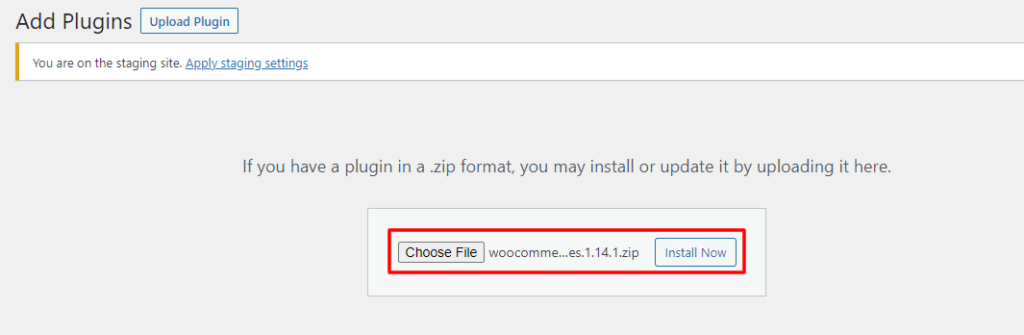
First, you need to install and activate the plugin. The WooCommerce Wholesale Suite has a free and premium version. For the features we want, the free version works perfectly. To install, go to WooCommerce > Plugin > Add New, search for the plugin, install and activate it.
2. Create Wholesale User Role
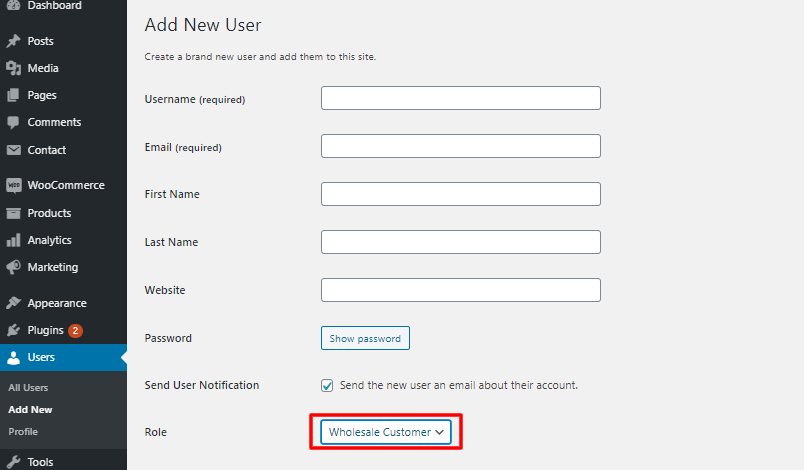
Now you need to create user roles for your wholesale buyers so that the product prices marked as wholesale will be visible to them only. For this, go to WooCommerce > Users > Add New. here you need to add information like name, email, first and last name, password, and in the “role” field, select the option “Wholesale Customer”. Click on “save” if you are editing an old user role or “Add New User” if this is newly created.
3. Add Wholesale Pricing to Products
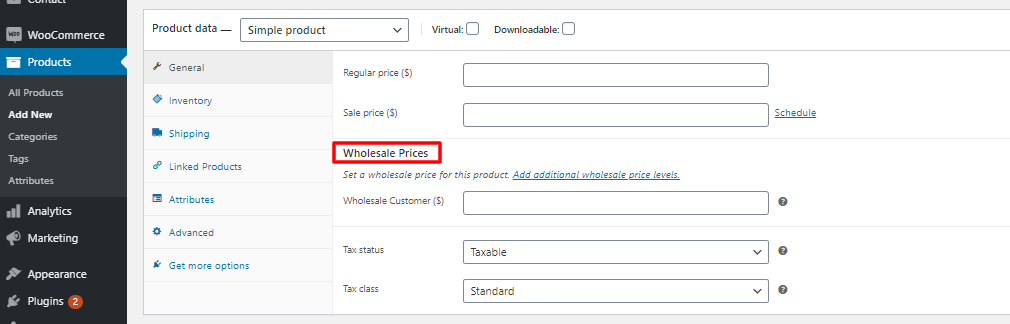
Now you need to create new products or edit existing products to add wholesale pricing to them. For this, go to WooCommerce > Products > Add New. after filling out basic information like title, description, tags, image, etc.
Go to the “Product Data” section and in the General tab, you will find a “Wholesale Prices” section below regular prices. Here you need to add the wholesale price and also the minimum quantity ordered to get this price.
Quantity-Based Wholesale Pricing
You can set multiple wholesale prices for a single product based on the quantity selected by the wholesale user. For this, go to the Product Data section and click on the option “Enable further wholesale pricing discounts based on quantity purchased”. Here you will set the user role, the starting and ending quantity, and the wholesale price for that quantity.
And you can repeat the process to create wholesale pricing for different quantities for the same product.
4. Customize the Frontend
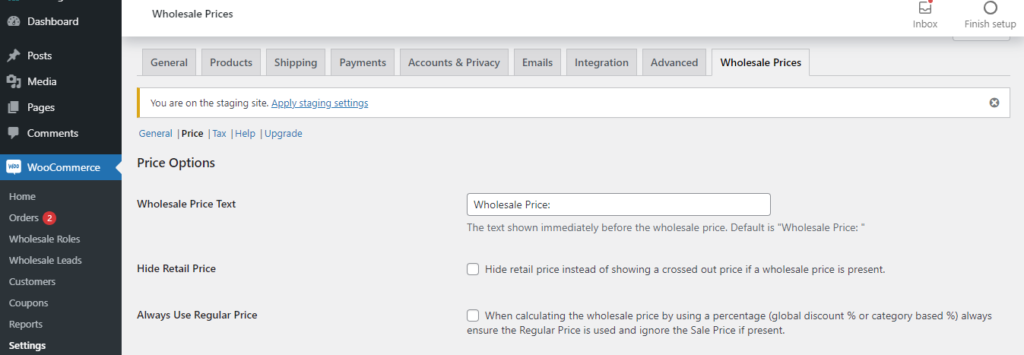
Although there isn’t much option for customization, you can change the text and how to display the pricing. Go to WooCommerce > Settings > Wholesale Prices. Select the price tab, there you can add a frontend text that will be visible to the wholesale users. You can also remove the default “crossed-out original price” display and just show the wholesale price.
Don’t forget to test out your plugin and see how it looks from the front end. For this, you would have to create a new wholesale user role and log in to check out how the prices are displayed.
Keep an eye on store metrics with WooCommerce Reporting and Analytics plugins
How to Set-Up Discounts for Wholesale Customers
You can also set up global discounts on products for wholesale users. For this, go to WooCommerce > Settings > Wholesale Prices. Click on the discount tab, choose the user role, and specify the discount percentage. Click on the “Add mapping” button to save. This discount will be automatically applied to all products regardless of if they have a wholesale price set or not.
You can do the same for quantity-based global discounts in the discount tab of Wholesale Prices.
Manage taxes easily with the best WooCommerce Sales Tax plugins
Wrap-Up
Wholesale on WooCommerce comes down to three pieces: a wholesale role, tiered prices on the products that matter, and an approval-based registration form. Wholesale Suite remains the most complete toolkit for this in 2026, with WholesaleX and Barn2’s Wholesale Pro as strong alternatives. Guide re-verified August 2026.